
Updated tutorials structure
Tutorials is now the reading order, not a duplicate of every guide.
Use this page to choose what to read next. Full explanations now live on the focused pillar pages: AI Infrastructure Hub for the big picture, Cloud for runtime choice, Prices for cost snapshots, Resource Library for official links, and Risk Levels for agent safety.
| Learning need | Go here | Why |
|---|---|---|
| Full AI infrastructure map | AI Infrastructure Hub | Agents, APIs, VPS, GPU cloud, pricing and safety in one central map. |
| OpenClaw or simple API workflow | OpenClaw vs API-First AI | Avoid overbuilding when a simple API-first workflow is enough. |
| Cloud/runtime decision | Cloud | Choose hosting, VPS, API-first AI, GPU cloud or enterprise cloud by workload. |
| Prices and budgets | Prices + Cost Planning | Use current source links and estimate one test run, normal day and bad day. |
| Official docs and pricing pages | Resource Library | Official model, cloud, GPU, hosting and support links in one place. |
| Agent safety before launch | Risk Levels + Go-Live Checklist | Choose permissions, logs, limits, rollback and approval rules before production. |
Page role
Tutorials is the learning order.
Use this page when you want the best reading sequence. It should not replace the AI Infrastructure Hub, Cloud guide or Prices page; it organizes them into a learning path.
Learn OpenClaw, Hostinger, AI agents and cloud hosting in the right order
This page is the main learning hub for GPUJet. It connects the most important tutorials into one clear path: first understand AI agents and OpenClaw, then learn how to launch OpenClaw on Hostinger, then compare cloud hosting, AI model pricing, GPU cloud platforms, forums, videos and social communities where real users share problems and solutions.
Do not start with the biggest cloud platform. Start with the task.
Beginners often ask which cloud provider is best before they define what they are building. That is the wrong order. First understand the task, then choose the tool.
Understand what an AI agent is
Start with the AI Agent page. Learn the difference between a normal chatbot, a workflow and a tool-using AI agent.
This gives you the mental model before you touch OpenClaw, Hostinger, AWS or GPU cloud.
Read the AI Agent Guide
Learn OpenClaw basics
OpenClaw is the main practical agent topic on GPUJet. Learn what it does, what it cannot guarantee,
how to think about tools, permissions, setup and real beginner mistakes.
Open OpenClaw for Beginners
Launch OpenClaw on Hostinger
After you understand the concept, learn the Hostinger setup path. This is the most beginner-friendly route if you want
OpenClaw online without building everything from scratch.
Open Hostinger OpenClaw Setup
Compare cloud and AI prices
Before renting GPUs, buying hosting or choosing model APIs, compare costs. AI projects can become expensive when users
forget servers, GPUs, tokens, storage or renewals.
Open GPUJet Prices
Build safely before scaling
If you move into trading bots, automation or production workflows, keep human approval, logs, API key safety,
simulation and cost limits. Do not give an agent dangerous permissions too early.
Read AI Trading Bot for Beginners
Best beginner rule
Start with one safe workflow: research, summarize, draft or organize. Do not start by giving an AI agent full control over email, publishing, files, money or exchange accounts.
Core tutorials to read first
These are the main internal pages and posts that should receive the most internal links from this Tutorials hub.
OpenClaw for Beginners
Learn what OpenClaw is, how AI agents work, what setup means, which risks matter and why permissions are important.
Hostinger Install OpenClaw
Beginner-focused setup guide for using Hostinger’s OpenClaw options, including managed setup and VPS responsibility.
Cloud Hosting Guide
Compare hosting options for AI projects, WordPress, VPS, simple apps, AI agents and beginner cloud experiments.
How to Run AI Without a GPU
A beginner guide for people who want to use cloud hosting and AI APIs instead of buying expensive GPU hardware.
AI Trading Bot for Beginners
Learn trading bot basics, simulation-first thinking, risk control and why automation cannot guarantee profit.
OpenClaw Trading Bot
A focused page for connecting OpenClaw ideas with trading bot education, API safety, alerts and controlled automation.
AI Bot
Use this page as a simpler introduction for users who are not ready for full AI agent architecture yet.
Prices
A useful pricing hub for AI models, GPU cloud, hosting and cost calculations. Link here whenever money or pricing appears.
FAQ
Use FAQ to answer beginner doubts about AI, cloud hosting, GPUs, OpenClaw, pricing and safe setup.
Popular AI cloud platforms and where they fit
Different cloud platforms solve different problems. Some are best for beginners, some for GPU experiments, and some for enterprise AI infrastructure.
| Platform | Best for | Beginner reality | Useful link |
|---|---|---|---|
| Hostinger OpenClaw | Beginner OpenClaw hosting and managed setup. | Best first path if the user wants to run OpenClaw without deep server work. | Hostinger OpenClaw |
| DigitalOcean | Developer-friendly VPS, apps, APIs, dashboards and GPU droplets. | Cleaner than hyperscalers for many beginners, but still requires server basics. | DigitalOcean GPU pricing |
| AWS Bedrock | Enterprise generative AI apps with managed foundation models. | Powerful but complex. Better after you understand billing, IAM and cloud architecture. | AWS Bedrock pricing |
| AWS SageMaker AI | Training, deploying and managing ML models. | Serious ML platform. Usually too much for a first OpenClaw test. | SageMaker pricing |
| Azure AI Foundry | Microsoft ecosystem, enterprise AI apps and model deployment. | Good for teams already using Microsoft tools. Pricing and setup need careful reading. | Azure AI Foundry |
| Google Cloud Vertex AI | Gemini, managed ML, large-scale AI and Google Cloud infrastructure. | Strong but not the easiest first setup for beginners. | Vertex AI |
| RunPod | GPU pods, serverless GPU inference and AI experiments. | Useful for GPU testing. Watch active time, storage and idle costs. | RunPod pricing |
| Vast.ai | Low-cost marketplace GPU rentals. | Can be cheap, but host reliability and security vary. Better for careful users. | Vast.ai pricing |
| CoreWeave | Enterprise GPU cloud and large AI workloads. | Serious AI infrastructure. Better for companies and large projects than first tests. | CoreWeave pricing |
| Nebius AI Cloud | GPU cloud for H100/H200/L40S workloads and AI infrastructure. | Interesting option for advanced AI infrastructure users. | Nebius pricing |
| Lambda Cloud | GPU instances and AI developer infrastructure. | Strong AI GPU brand. Always check current availability and exact price. | Lambda Cloud |
| Together AI | Hosted open-source model APIs, inference and fine-tuning. | Useful if you want AI APIs without managing GPU servers directly. | Together AI pricing |
Simple platform advice
Use Hostinger for OpenClaw beginner hosting. Use DigitalOcean for clean VPS and developer projects. Use RunPod or Vast.ai for GPU experiments. Use AWS, Azure, Google Cloud, CoreWeave or Nebius when you need serious infrastructure.
Useful OpenClaw and Hostinger video tutorials
Videos are useful for seeing the setup visually. Use them for orientation, but verify commands, pricing and dashboards with official documentation because AI tools and hosting panels change quickly.
Secure OpenClaw on Hostinger
Useful for safety, API keys, permissions and spend control.
Watch video
Find Newer OpenClaw Videos
Use search to find newer videos if Hostinger or OpenClaw changes.
Search YouTubeVideo rule
Do not copy old commands blindly. If a video shows a dashboard that looks different from your Hostinger hPanel, open Hostinger support and OpenClaw documentation before continuing.
Future tutorials that would strengthen GPUJet
These pages would make GPUJet stronger as a topical authority site around OpenClaw, AI agents, cloud hosting and GPU infrastructure.
OpenClaw vs n8n
Explain when to use an AI assistant and when to use a workflow automation tool.
AWS Bedrock for Beginners
Explain Bedrock, models, agents, knowledge bases, pricing and guardrails in simple English.
RunPod vs DigitalOcean GPU
Compare beginner GPU hosting for inference, local models, image generation and short experiments.
AI Agent Security Checklist
A focused guide about API keys, permissions, webhooks, logs, approval steps and safe automation.
OpenClaw Troubleshooting Guide
Collect real errors: channel pairing, Docker problems, browser automation, memory and server restarts.
AI Cloud Price Tracker
Track Hostinger, AWS, RunPod, CoreWeave, Nebius, DigitalOcean GPU and AI model API prices.
SEO strategy
Keep this Tutorials page as the hub. Every new tutorial should link back here, and this page should link out to every important guide. That creates a clear internal structure for users and search engines.
Next learning levels
Go beyond beginner tutorials
After the beginner path, continue with more concrete OpenClaw, Hostinger, API, cloud and production-readiness tutorials. These two pages are designed for users who want more exact steps, more verified sources and a clearer path toward real AI infrastructure.
Practical expansion
New focused tutorials
Pillar guides
Start planning like a real AI builder
SEO comparison guides
Provider, GPU and automation comparisons
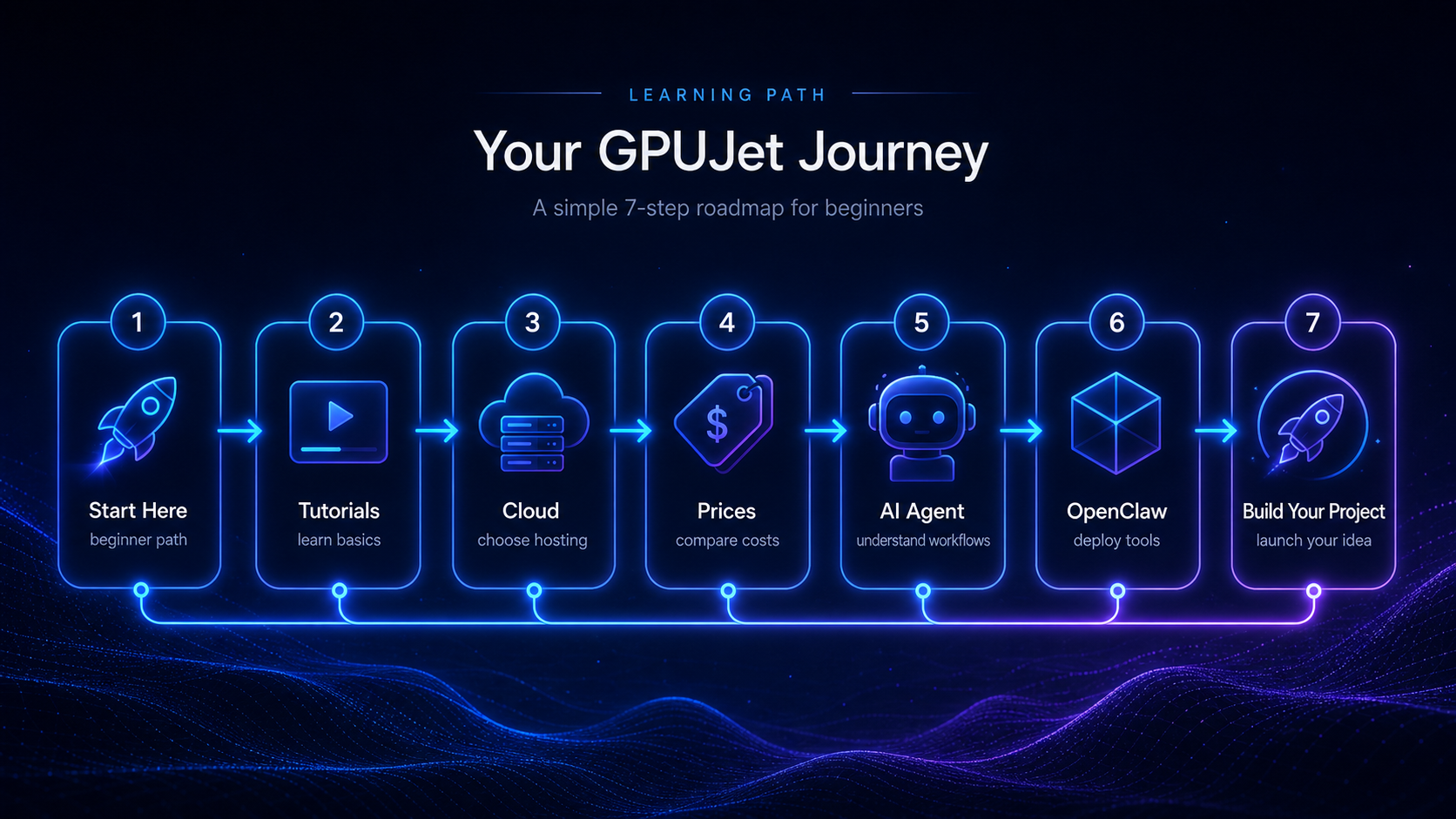
Learning roadmap
Follow the GPUJet beginner path.
Use this roadmap to move from beginner tutorials to cloud hosting, price comparison, AI agents, OpenClaw and your first real project.
OpenClaw clarity
OpenClaw is the tool. Hostinger is only one deployment path.
GPUJet uses OpenClaw as a practical example for learning AI agents, automation workflows, tool permissions and cloud deployment. A beginner can start with Hostinger because it is simpler, but OpenClaw-style workflows should also be understandable on any VPS, Docker setup or local test environment.
| Path | Best for | Skill level | Why it matters |
|---|---|---|---|
| Hostinger managed setup | Fast beginner start | Beginner | Good when you want fewer server details. |
| Hostinger VPS | More control with beginner hosting | Beginner / intermediate | Useful when you want to learn Linux, ports, SSL and backups. |
| DigitalOcean VPS | Clean developer setup | Intermediate | Good neutral cloud path beyond one host. |
| Hetzner VPS | Price/performance | Intermediate | Good when budget matters and you can handle more setup. |
| Docker on any VPS | Portable setup | Intermediate | Keeps the workflow less dependent on one provider. |
| Local test environment | Safe learning | Beginner / intermediate | Best before exposing anything publicly. |
Best next tutorial path
Start with the map, then choose the right workflow guide.
Use Tutorials for the reading order. Use the AI Infrastructure Hub for the complete system map. Then choose whether your project should stay API-first, use OpenClaw-style workflows, or move toward agent safety and production controls.
AI Infrastructure Hub OpenClaw vs API-First AI Agent Risk LevelsCurrent tutorial focus
The old “future guide ideas” are now real learning paths.
GPUJet now has focused pages for infrastructure, cost planning, API-first decisions, agent risk levels and go-live readiness. Use these current guides instead of the older planning list.
AI Infrastructure Hub Cost Planning OpenClaw vs API-First
Where to find community fixes, complaints and practical advice
Official documentation tells you how a tool is supposed to work. Social communities show where people actually get stuck. Use both, but never paste private credentials, API keys or server passwords into public discussions.
Good for OpenClaw setup issues, Hostinger experiences, user complaints and real troubleshooting stories.
Open communityUseful for Hostinger VPS, hPanel, support experience, pricing questions and beginner hosting problems.
Open communityStrong community for local models, GPU choices, inference speed, Ollama, model hosting and hardware limits.
Open communityUseful if you want to understand agents, LangGraph, RAG, workflows, tools and debugging agent behavior.
Open forumGood for developer discussions about AI tools, cloud hosting, OpenClaw alternatives and infrastructure choices.
Search Hacker NewsBest for exact technical problems: Docker, ports, VPS errors, API keys, Python, Node, Linux and deployment issues.
Search Stack OverflowCheck known bugs, installation problems, feature requests, release changes and project updates.
Open GitHub IssuesUse official Hostinger support for hPanel, managed OpenClaw, VPS templates, AI credits and account-specific setup.
Open supportUseful for new announcements, but not ideal for exact technical commands. Verify everything before running it.
Search XFind newer visual walkthroughs when dashboards change. Always compare videos with official documentation.
Search YouTubeUseful for cloud companies, AI infrastructure posts, product launches and professional discussions.
Search LinkedInHelpful for fast community support, but only join trusted servers. Never share API keys or private screenshots.
Open DiscordSocial safety rule
Never share API keys, WordPress admin details, SSH keys, server IPs with credentials, exchange API keys, private URLs, seed phrases or payment information in public forums, Reddit, Discord, YouTube comments or screenshots.