
AI agents are workflows, not magic chatbots.
An AI agent starts with a goal, uses context and tools, produces an output, logs what happened and asks for human approval before risky actions. GPUJet explains agents through safe, practical examples.
Understand the full AI agent loop.
The useful part of an agent is not just the model response. It is the controlled loop: input, planning, tool use, memory/context, guardrails, review and final output.
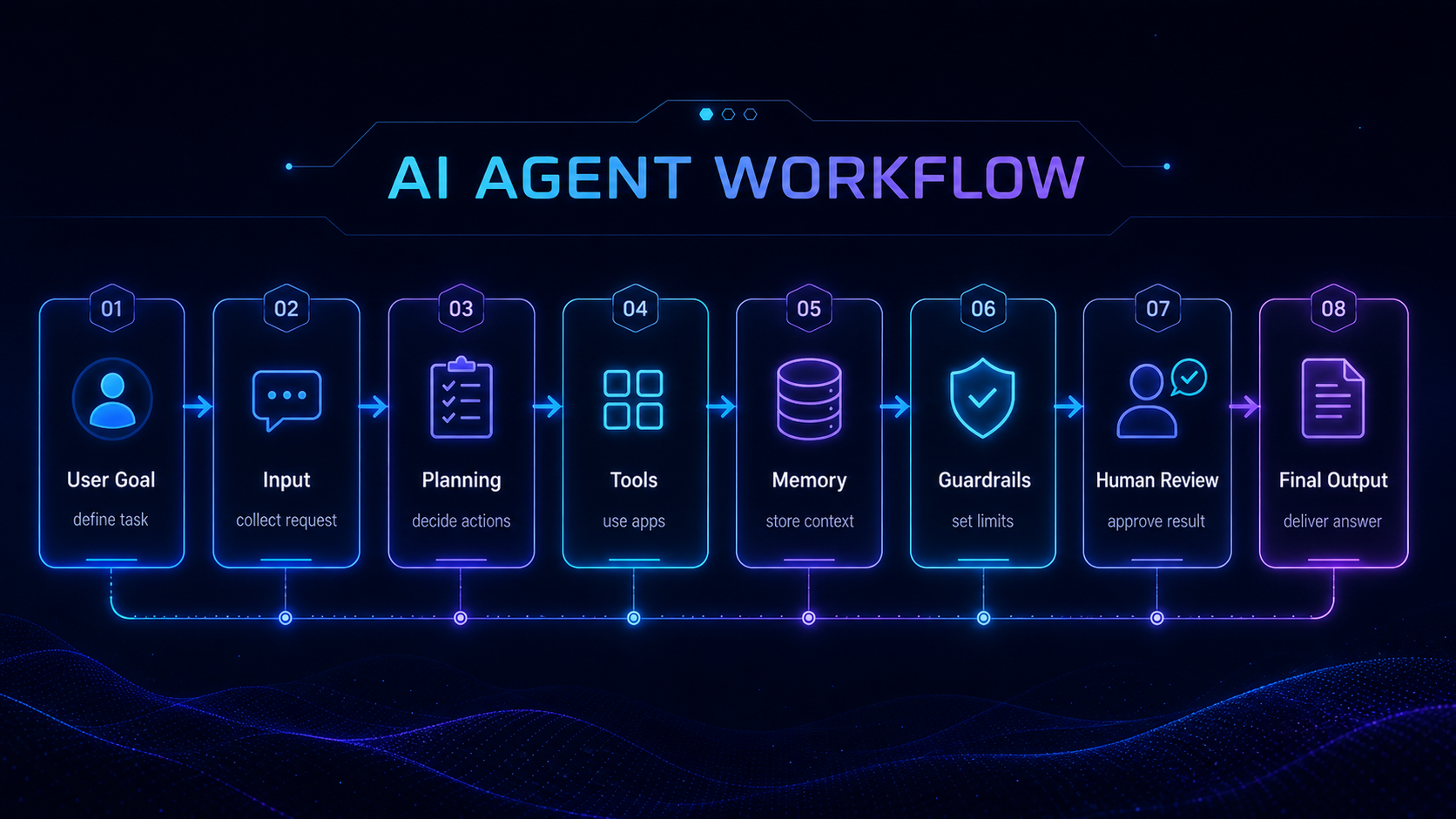
What makes something an AI agent?
Chatbot, automation bot and AI agent are different.
| Type | What it does | Best for | Main risk |
|---|---|---|---|
| Chatbot | Answers questions and chats with users. | FAQ, support, education, simple Q&A. | May sound confident without enough context. |
| Automation bot | Runs predefined triggers and actions. | App workflows, notifications, repetitive business tasks. | Can break if the process changes. |
| AI agent | Works toward a goal, chooses steps and uses tools. | Research, drafting, support triage, coding help, monitoring. | Needs logs, limits, approval and permission control. |
Support draft agent for an SSL setup question.
This example keeps the agent useful but controlled. It can classify the issue, search a knowledge base and draft a reply, but it cannot send without review.
Input
Customer message:
"My OpenClaw dashboard loads on HTTP, but HTTPS gives an SSL error. What should I check first?"
Workflow
steps:
  - classify_issue: ssl_or_dns
  - check_knowledge_base: ssl_setup
  - draft_reply
  - add_warning: do_not_share_private_keys
  - require_human_approval
Draft output
Draft reply:
First check that the domain points to the correct server IP. Then confirm SSL is active in your hosting panel. If DNS was changed recently, wait for propagation and reload using https://. Do not share private keys or admin screenshots publicly.
Example log
[10:14] input_received: ssl setup question
[10:14] issue_classified: ssl_or_dns
[10:15] knowledge_base_used: ssl_setup
[10:15] draft_created: true
[10:15] approval_required: true
[10:18] human_review: edited_before_sending
Where beginners can use agents safely.
Every serious agent should have these controls.
| Control | Minimum beginner rule | Why it matters |
|---|---|---|
| Human approval | Required before sending, publishing, deleting or spending. | Prevents silent mistakes from becoming public or expensive. |
| Logs | Store input category, tool used, output type and approval result. | Makes debugging and trust possible. |
| API limits | Set daily/monthly limits before sharing the workflow. | Reduces surprise bills and runaway test loops. |
| Tool permissions | Start read-only or draft-only. | Keeps the agent away from real systems too early. |
| Rollback plan | Know how to disable keys, webhooks or services quickly. | Gives you a safe exit when a workflow misbehaves. |
How OpenClaw fits into AI agent learning.
Concept
AI agent = goal, planning, tools, memory/context, guardrails, logs and output.
Tool path
OpenClaw can be treated as one practical path for learning agent-style workflows and automation.
Deployment
Hostinger, DigitalOcean, Hetzner or any VPS are places where the workflow can run, not the definition of the workflow.
Trading agents need extra limits.
AI agents can help monitor signals, summarize market information or organize research, but trading automation is risky and should never be presented as guaranteed profit.
Simulation first
Test with historical data or paper trading before any real-money workflow.
Alerts before execution
A safer first use case is alerting and analysis, not automatic trading.
Strict permissions
Never give broad exchange/API permissions before understanding risk controls.
Start with one safe agent workflow.
Choose one task, keep it draft-only, log every run and require human review. Then improve the workflow before adding more tools or permissions.
Next step
Choose the right risk level before giving an agent real power.
After learning what an AI agent is, use GPUJet’s risk-level framework to decide whether your workflow should stay draft-only, suggest actions, require approval or remain blocked until stronger controls exist.
Open AI Agent Risk Levels AI Infrastructure HubBefore production
Do the go-live checklist before an agent touches real users.
Before moving from test to production, confirm logs, limits, human approval, rollback, privacy and billing controls. A useful agent is not ready until it is also reversible and monitored.
AI Agent Go-Live ChecklistCopy template
Safe AI agent workflow template.
Copy this beginner-safe workflow template and adapt it before connecting tools, APIs or public channels.
workflow_name: support_reply_draft
risk_level: Level 2 approval-required
trigger: new_support_message
model: hosted_api
steps:
  - classify_issue
  - search_knowledge_base
  - draft_reply
  - require_human_approval
  - log_result
guardrails:
  - never_send_without_approval
  - hide_private_data
  - stop_if_confidence_is_low
cost_controls:
  - daily_api_budget_limit
  - max_retries_per_request
  - alert_on_usage_spike
rollback:
  - disable_public_trigger
  - revoke_or_rotate_api_key
  - stop_vps_service_or_container
  - disconnect_webhook
  - restore_backup_if_needed