
Page role
Cloud is for choosing the runtime.
Use this page when the main question is where the project should run: normal hosting, VPS, API-first AI, GPU cloud or enterprise cloud. For the bigger decision map, use the AI Infrastructure Hub. For exact cost planning, use Prices and AI Cost Planning.
Choose cloud by workload, not by hype.
This guide helps beginners choose between normal hosting, VPS, API-based AI, GPU cloud and enterprise cloud. The goal is simple: use the smallest setup that can run the project safely, then upgrade only when the workload proves it needs more power.
Cloud choice in one sentence
See the cloud paths before choosing.
Hostinger, DigitalOcean, Hetzner, RunPod and AWS solve different problems. A beginner website, AI agent, GPU experiment and production workflow should not use the same setup.
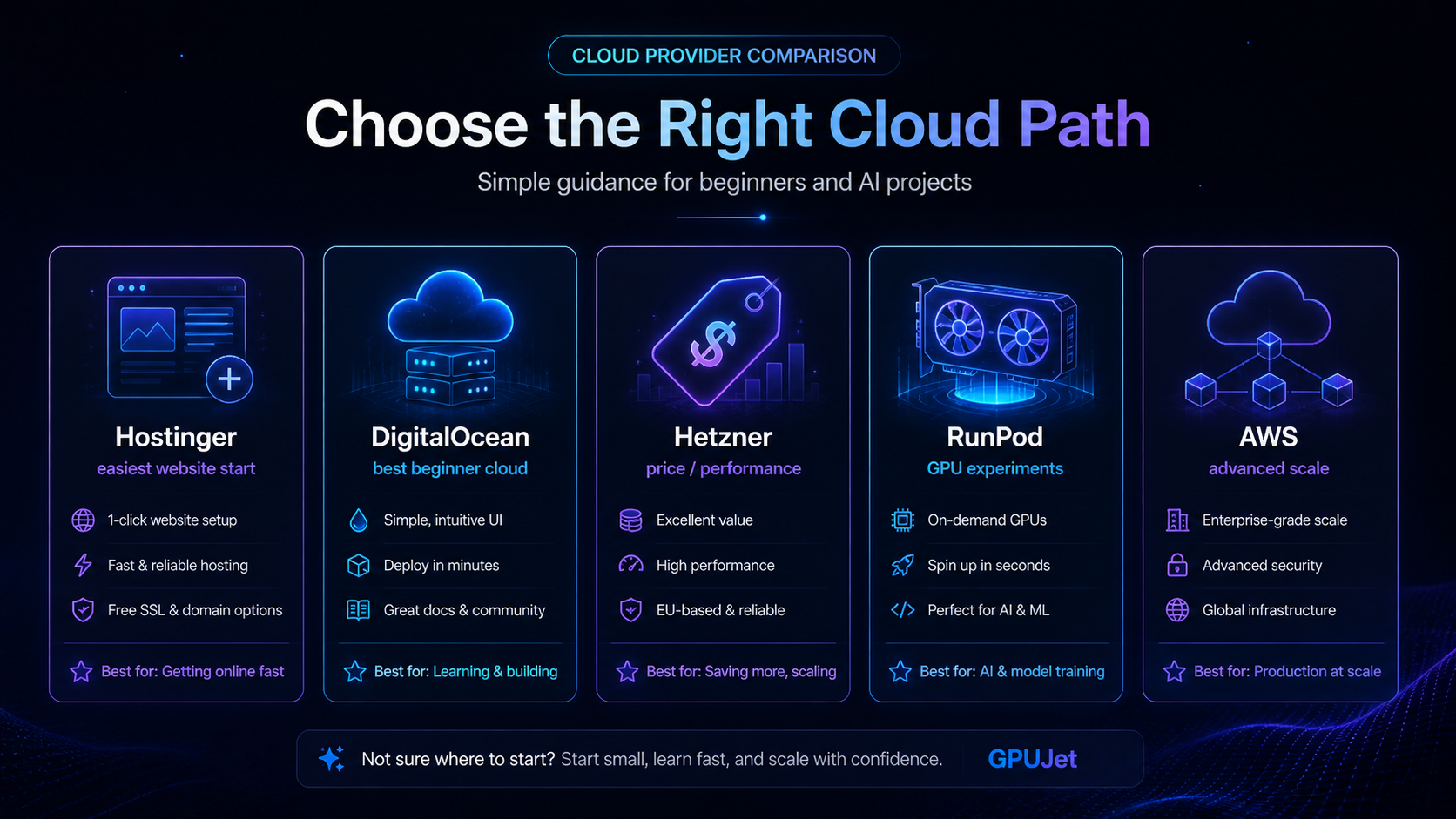
Which cloud setup should you choose?
Use the workload, not the brand name. This table gives a practical starting point and links to the next GPUJet guide for each case.
| Project | Best first setup | Why | Next link |
|---|---|---|---|
| WordPress blog with AI drafts | Normal hosting + model API | No GPU is needed for outlines, FAQs, draft sections and internal-link suggestions. Watch API token usage instead of server power. | AI API Cost Control |
| OpenClaw beginner test | Small VPS + Docker or managed setup | Enough to learn dashboard access, DNS, SSL, logs, API keys and manual approval without paying for GPU compute. | OpenClaw for Beginners |
| Local LLM or image model test | Short GPU cloud session | Use GPU only when the model needs VRAM or CPU inference is too slow. Stop the instance when the test ends. | GPU Cloud Decision Guide |
| Production agent workflow | VPS + logs + alerts + backup | Reliability, rollback, cost limits and observability matter more than raw GPU power for most agent workflows. | Run an AI Agent on a VPS |
What each provider is best for.
Hostinger
Best for beginner websites, WordPress, landing pages and users who want a simple dashboard before deeper server work.
- Good for: content sites and managed paths
- Watch out for: heavy AI workloads
- Visit Hostinger
DigitalOcean
Best for clean VPS learning, APIs, bots, dashboards, small apps and developer-friendly cloud projects.
- Good for: Droplets, apps, GPU droplets
- Watch out for: advanced enterprise complexity
- Visit DigitalOcean
Hetzner
Best for price/performance when you are comfortable learning Linux, SSH, DNS, ports and backups.
- Good for: value VPS
- Watch out for: more technical responsibility
- Visit Hetzner
RunPod / Vast.ai
Best for short GPU experiments where you need VRAM for model testing and can stop the machine quickly.
- Good for: burst GPU workloads
- Watch out for: idle costs and host quality
- Compare GPU hosts
AWS
Best for enterprise-scale infrastructure, managed services and teams that can handle IAM, billing and architecture.
- Good for: serious scale
- Watch out for: complexity and surprise bills
- Visit AWS
API-first AI
Best when you need model output but do not need to host the model yourself. Often the smartest first step.
- Good for: assistants, summaries, drafts
- Watch out for: token volume and limits
- Compare AI prices
Example: small AI research assistant on a VPS.
This is a realistic beginner test before building a large AI system. The goal is not maximum power — it is learning deployment, logs, API cost and failure points.
Test setup
Goal: summarize research notes and draft article outlines. Server: small VPS or beginner cloud plan. Runtime: Docker-based app or simple web service. AI: hosted model API instead of local GPU. Controls: API limit, manual approval and basic logs.
Result notes
What worked: outlines, summaries and FAQ drafts. What failed: long context, weak prompts and missing logs. Cost lesson: limit requests before sharing. Safety lesson: never auto-publish generated content.
Practical rules before paying for cloud.
VPS baseline
For Docker tests, 2 vCPU and 4–8 GB RAM is a more comfortable starting point than the smallest possible machine. Tiny servers can work, but debugging becomes harder when memory is tight.
GPU baseline
A one-hour GPU test is normal. A GPU left running 24/7 is a budget risk. Always calculate hourly, daily and monthly cost before renting.
API baseline
Short prompts are cheap to test. Long documents, long outputs and repeated retries can raise token costs quickly. Set limits before sharing the tool.
Cloud errors that waste time or money.
Choosing by brand first
Pick the workload first, then provider. A blog helper, a VPS agent and a GPU model test need different setups.
Leaving GPU running
Marketplace GPU pricing looks small hourly, but the monthly equivalent can surprise beginners. Stop or destroy unused resources.
No backup before changes
Before changing server config, DNS, SSL, Docker compose files or WordPress content, create a rollback point.
Next pages for smarter cloud decisions.
Tutorials
Follow the full GPUJet learning path for AI, cloud, OpenClaw and cost control.
Prices
Check AI model prices, GPU hourly math and realistic beginner scenarios.
AI Agent
Understand input, tools, guardrails, logs, approval and final output.
OpenClaw for Beginners
Learn what OpenClaw is, what it is not and how to test it safely.
Hostinger vs DigitalOcean
Compare beginner hosting with developer cloud for AI projects.
Best AI Hosting Providers
Compare hosting paths by workload, skill level and project stage.
Start with the smallest useful cloud setup.
Pick one workload, test one setup, measure cost and only then scale. That is how beginners avoid paying for infrastructure they do not need.
Next cloud decision
Map the stack before choosing a cloud provider.
Cloud is only one layer. Before choosing Hostinger, DigitalOcean, GPU cloud or AWS, decide whether the project needs API-first AI, an OpenClaw-style workflow, a VPS runtime or direct GPU compute.
AI Infrastructure Hub OpenClaw vs API-First AI Resource LibraryGPUJet Runtime Matrix
Choose the runtime by workload, not by hype.
Cloud decisions become easier when you separate model access, workflow runtime and direct compute. Most beginner projects should start API-first or VPS-first. GPU cloud becomes useful only when the workload needs direct model compute, VRAM, local inference, fine-tuning or heavy image/video processing.
| Runtime choice | Best for | Cost pattern | Skill level | Do not use when… |
|---|---|---|---|---|
| API-first AI | Drafts, summaries, classification, FAQ answers, support reply drafts, simple assistants. | Usage-based token cost. Usually low at the start, but can grow with long prompts and retries. | Beginner | You must run the model locally, need custom VRAM-heavy inference or have strict self-hosting requirements. |
| Normal hosting | WordPress sites, content projects, simple forms, static pages and lightweight AI-assisted workflows. | Predictable monthly hosting cost plus API usage. | Beginner | You need background workers, Docker, custom services, long-running agents or server-level control. |
| VPS | OpenClaw-style workflows, small AI agents, dashboards, API backends, webhooks, logs and background tasks. | Predictable monthly server cost, plus model API usage and backups. | Beginner / intermediate | You do not want to manage updates, security, ports, SSL, backups or server monitoring. |
| GPU cloud | Local LLM tests, image models, fine-tuning experiments, VRAM-heavy inference and short compute bursts. | Hourly billing. Cheap for short tests, expensive if left running. | Intermediate | Your app only needs hosted API output or you cannot monitor active GPU time. |
| Serverless AI | Event-based tasks, bursty inference, small API endpoints and jobs that do not run all day. | Pay-per-use. Can be efficient, but cold starts, limits and hidden usage units matter. | Intermediate | You need predictable long-running services or simple beginner debugging. |
| Enterprise cloud | Teams, compliance, managed AI platforms, IAM, audit logs, enterprise security and production scale. | Powerful but complex. Costs can include many separate services. | Advanced | You are building your first small AI workflow and do not need enterprise controls yet. |
AI Infrastructure Cost Calculator
Estimate API, VPS and GPU cloud cost before you build.
Enter rough numbers to estimate cost per run, daily API cost, monthly API cost, GPU cloud exposure and total monthly infrastructure cost. Always verify official pricing before payment.
Your usage assumptions
Formula: token cost = input tokens × input price / 1,000,000 + output tokens × output price / 1,000,000. Monthly estimate uses 30 days.
Estimated result
Recommendation: API-first plus a small VPS is likely enough for the first version.
Related GPU Decision Guide
Not sure whether your AI project needs GPU cloud, a local GPU, a VPS or only an AI API? Read the practical GPUJet guide: Do I Need a GPU for AI?